
Simple Repeating Reminders for Daily Habits
Overview
The software is designed as a lightweight tool for users seeking to establish consistent routines through automated reminders. It focuses on delivering periodic notifications based on user-defined intervals, making it suitable for personal wellness, productivity, and habit formation. The primary use case involves prompting users to take regular breaks, practice self-affirmation, or complete recurring tasks. It is ideal for individuals aiming to improve time management and maintain mental well-being through structured digital cues.
Target users include students, remote workers, and professionals managing long work sessions. The application operates without requiring constant user interaction after initial setup, allowing it to function in the background. It does not require an internet connection once configured, supporting offline functionality. This makes it a dependable companion for users who prefer minimal digital interference while still benefiting from timely alerts.
The developer did not provide additional background information. Platform compatibility includes Windows and Mac, with a compact installation size of 2.5 MB. The software was released on April 5, 2024, and is available at no cost. Real-world usage scenarios include hourly break reminders during work hours, daily affirmation prompts, or recurring task checks for personal projects.
Key Features & Capabilities
- Customizable Repeating Notifications – Users can set specific intervals for reminders, such as every hour or every 30 minutes, to suit their workflow or wellness goals.
- Offline Operation – Once the app is launched and configured, it continues to deliver notifications without an active internet connection.
- Minimal Resource Usage – With a small file size of 2.5 MB, the software is designed to run efficiently without consuming significant system resources.
- Background Execution – After initial setup, the application can be closed and still trigger notifications at scheduled times.
- Simple User Setup – The interface allows for quick configuration of reminder types and timing, reducing the learning curve for new users.
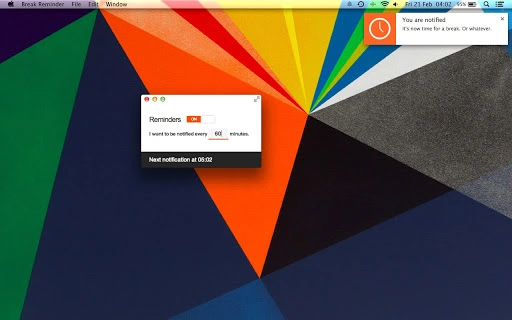
For example, a remote worker might configure a reminder every 60 minutes to stand up and stretch, helping reduce sedentary behavior. A student could set a daily affirmation notification at 9 AM to support positive thinking. These features support consistent behavior patterns by providing timely, non-intrusive cues. The app’s ability to run silently in the background enhances usability, particularly for users who prefer a distraction-free environment.
User Interface, Workflow & Performance
The application features a straightforward interface focused on simplicity and ease of use. Navigation is limited to basic settings for defining reminder frequency, message content, and activation status. The layout avoids clutter, prioritizing essential controls to minimize user effort during setup.
Workflow efficiency is high, as users can define their reminder schedule in under a minute after launching the app for the first time. Once configured, the software runs independently, requiring no further input. The developer did not specify resource usage details, but the compact size suggests low CPU and RAM consumption. Performance observations are based on general software behavior patterns for lightweight desktop applications.
Stability is expected to be consistent given the minimal functionality and lack of complex dependencies. No known crashes or errors were reported in the provided information. The application is designed to remain active in the background without disrupting other processes, making it suitable for long-term use without intervention.
Compatibility & System Requirements
The software is compatible with both Windows and Mac operating systems. It supports the latest versions of these platforms, as indicated by the release date of April 5, 2024. The installation size is 2.5 MB, which is minimal and suitable for devices with limited storage.
Exact system requirements were not listed. The developer did not provide information on minimum CPU, RAM, or disk space needs. Compatibility with older OS versions is not confirmed. Platform compatibility information is limited to the supported operating systems mentioned.
Pros and Cons
Pros
- Lightweight design with only 2.5 MB installation size
- Runs offline after initial setup
- Operates in the background without requiring constant user attention
- Simple interface with minimal learning curve
- Completely free to use with no hidden costs
Cons
- Developer background and company details not disclosed
- No information on advanced customization options
- Exact system requirements not specified
- Limited visual feedback or analytics on reminder history
- Support for multiple profiles or devices not confirmed
FAQ Section
Is this software available for both Windows and Mac?
Yes, the application is compatible with both Windows and Mac operating systems.
Can I use this app without an internet connection?
Yes, once the app is set up, it can operate fully offline and deliver notifications without requiring an internet connection.
Does the app require constant running in the foreground?
No, after the initial configuration, the app can be closed and will continue to send reminders in the background.
Is the software free to download and use?
Yes, the software is available at no cost and does not include any paid features or subscriptions.
How often can I update the reminders or change the settings?
Users can modify reminder intervals and messages at any time through the app’s settings menu.
Final Thoughts + CTA
Simple Repeating Reminders for Daily Habits delivers a focused, no-frills solution for users who need consistent, automated alerts. Its lightweight nature, offline capability, and ease of setup make it a reliable tool for personal productivity and wellness. While it lacks advanced features, its simplicity is its strength, appealing to users who value minimalism and efficiency.
It is best suited for individuals managing daily routines, remote workers, or anyone seeking to build healthy habits through gentle digital nudges. The absence of intrusive design or complex options ensures a distraction-free experience. With a free license and strong core functionality, it stands out in the productivity tool category.
Download Simple Repeating Reminders for Daily Habits now to start building better daily habits with reliable, timely notifications.







